Explains every violation
11-hour, 14-hour, 30-minute break and 70-hour / 8-day violations, explained to the second in plain words, with the logbook graph.
Every violation explained. Most of them fixed.
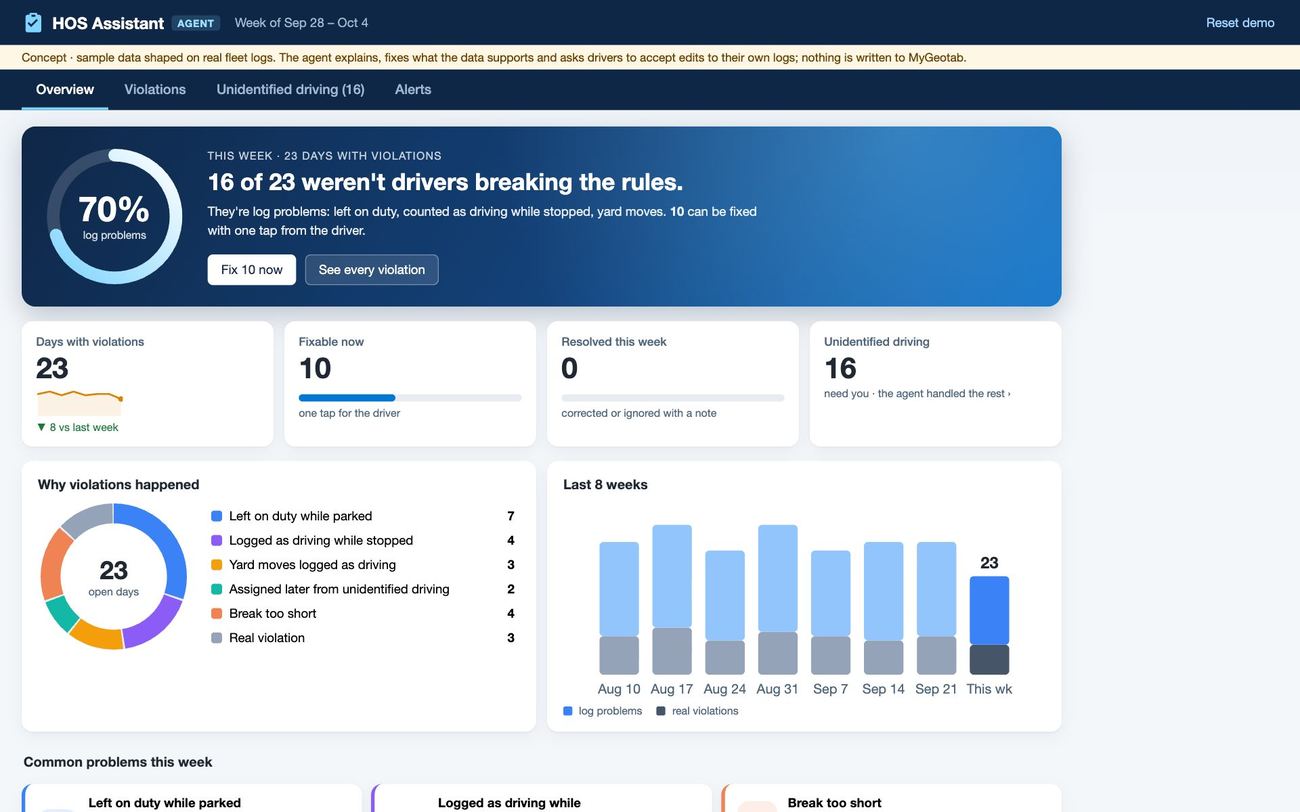
HOS Assistant explains every hours-of-service violation in plain words, proposes the log edits the data supports, and sends them to the driver to accept in Geotab Drive.
What it does
11-hour, 14-hour, 30-minute break and 70-hour / 8-day violations, explained to the second in plain words, with the logbook graph.
Most violations turn out to be log problems, not drivers breaking the rule: left on duty while parked, logged as driving while stopped, yard moves logged as driving, or driving assigned later from unidentified.
It proposes the edit. The edit only counts once the driver accepts it in Geotab Drive, as the ELD rule requires.
A real violation gets a coaching tip, never an edit.
Annotates yard and shop moves, finds the likely driver and asks “Was this you?”. The admin sees only what it can’t resolve.
Nudges for on duty with the engine off, a Monday check of weekend logs, trucks that keep logging driving while stopped, and stale open logs.
A heads-up before a limit, a violation alert with the cause and the fix, and a daily digest by email, Teams or text.
How it works
The agent does the log review. Drivers and admins make the changes.
HOS Assistant reads duty status logs and violations from MyGeotab.
Rules work out what caused each violation: a log problem or a real violation.
For log problems, it proposes the edit in plain words. The driver accepts or rejects it in Geotab Drive.
Real violations go to coaching. Anything it can’t resolve goes to the admin.
Start with an HOS check
With your written permission, we run HOS Assistant read-only over a few weeks of your fleet’s logs and give you a report. Nothing is changed in MyGeotab.
The share of your violations that were log problems.
How many violations one driver edit would clear.
How much unidentified driving is waiting to be assigned or annotated.
AO Agents
No video analysis. No personal details sent to AI.
Best fit: multi-branch or multi-carrier fleets with a compliance or EHS team, mixed Lytx and Geotab cameras, or HOS pain. MyGeotab fleets only.
Your playbook routes every event and every log. The facts come from the rules engine.
The agent writes the plain-language messages and explanations from those facts.
Discipline, payouts and log edits are always a person’s call.
Who it’s for
A safety program that runs itself.
Safety Hub routes every camera and Geotab driving event through your playbook. Drivers coach themselves on routine events in Geotab Drive. Only the exceptions reach a manager.
Retire the paper motor pool form.
Motor Pool is a MyGeotab and Geotab Drive add-in that replaces the paper motor pool rental form: reservations, sign-out and sign-in, DVIR, trip log and monthly chargeback by cost center.
A live ETA on every dispatch ticket.
Dispatch ETA puts a live ETA on every dispatch ticket inside MyGeotab, flags loads as on time, at risk or late, and writes status back to your dispatch system.
A short walkthrough of the working demo, then a conversation about what a pilot would look like for your fleet.
Request a demorocket_launch